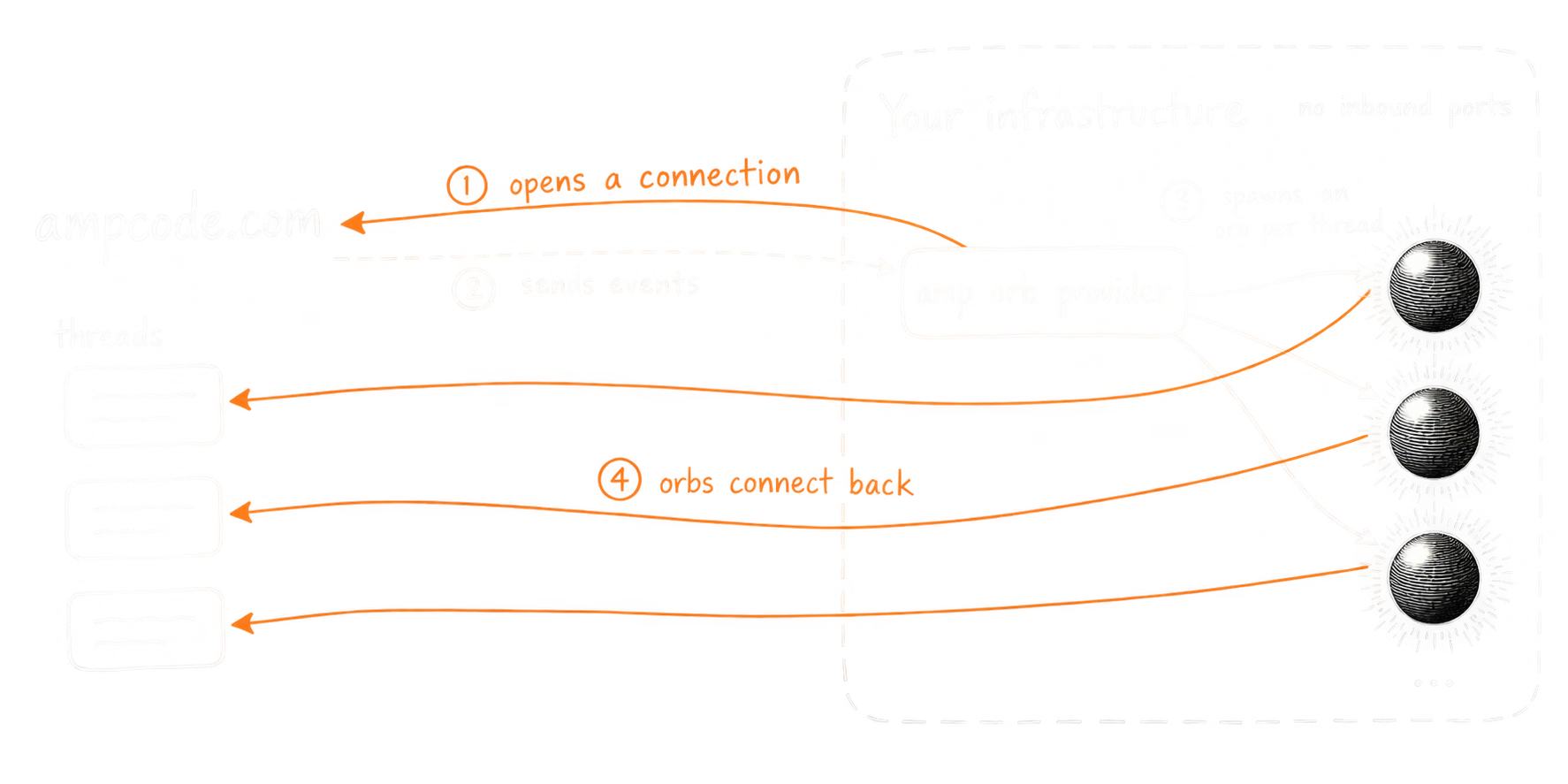
Notes from running amp orb provider on my own machines with the Docker dispatch. Install the CLI first, register a provider under Settings → Orbs, and copy the aop_live_… token.
Install the Amp CLI
curl -fsSL https://ampcode.com/install.sh | shInstall the desktop app
brew install --cask amp-appmacOS
Running manually
dispatch.sh
#!/usr/bin/env bash
# dispatch.sh — Apple Silicon; swap to amd64 image/platform on Intel hosts
set -euo pipefail

case "$ORB_OPERATION" in
  spawn)
    image="$ORB_IMAGE"
    if [ -n "${ORB_SNAPSHOT_ID-}" ] && container image inspect "$ORB_SNAPSHOT_ID" >/dev/null 2>&1; then
      image="$ORB_SNAPSHOT_ID"
    fi
    container start "$ORB_ID" 2>/dev/null || container run -d --name "$ORB_ID" \
      --cpus 4 --memory 8G --entrypoint sleep "$image" infinity
    container exec -d --env ORB_TOKEN "$ORB_ID" amp orb bootstrap
    ;;
  pause)
    container stop "$ORB_ID"
    [ -z "${ORB_SNAPSHOT_ID-}" ] || container commit "$ORB_ID" "$ORB_SNAPSHOT_ID"
    ;;
  delete)
    container delete --force "$ORB_ID"
    ;;
esac
Start the provider
chmod +x dispatch.sh
export AMP_ORB_PROVIDER_TOKEN="aop_live_…"
export ORB_IMAGE=us-central1-docker.pkg.dev/amp-prod-0/amp-orb/amp-orb-arm64:latest
amp orb provider "$(pwd)/dispatch.sh"
Running via launchd service
~/Library/LaunchAgents/dev.giraycoskun.amp-orb-provider.plist
<?xml version="1.0" encoding="UTF-8"?>
<!DOCTYPE plist PUBLIC "-//Apple//DTD PLIST 1.0//EN"
  "http://www.apple.com/DTDs/PropertyList-1.0.dtd">
<plist version="1.0">
<dict>
  <key>Label</key>
  <string>dev.giraycoskun.amp-orb-provider</string>
  <key>ProgramArguments</key>
  <array>
    <!-- absolute path from `which amp` -->
    <string>/usr/local/bin/amp</string>
    <string>orb</string>
    <string>provider</string>
    <string>/Users/giraycoskun/orbs/dispatch.sh</string>
  </array>
  <key>EnvironmentVariables</key>
  <dict>
    <key>AMP_ORB_PROVIDER_TOKEN</key>
    <string>aop_live_…</string>
    <key>ORB_IMAGE</key>
    <string>us-central1-docker.pkg.dev/amp-prod-0/amp-orb/amp-orb-arm64:latest</string>
    <key>PATH</key>
    <string>/usr/local/bin:/opt/homebrew/bin:/usr/bin:/bin:/Users/giraycoskun/.orbstack/bin</string>
  </dict>
  <key>RunAtLoad</key>
  <true/>
  <key>KeepAlive</key>
  <true/>
  <key>StandardOutPath</key>
  <string>/tmp/amp-orb-provider.log</string>
  <key>StandardErrorPath</key>
  <string>/tmp/amp-orb-provider.log</string>
</dict>
</plist>
Load and inspect the service
launchctl bootstrap gui/$(id -u) ~/Library/LaunchAgents/dev.giraycoskun.amp-orb-provider.plist
launchctl kickstart -k gui/$(id -u)/dev.giraycoskun.amp-orb-provider
launchctl print gui/$(id -u)/dev.giraycoskun.amp-orb-provider | head -20
Linux
~/.config/systemd/user/amp-orb-provider.service
[Unit]
Description=Amp orb provider

[Service]
Environment=AMP_ORB_PROVIDER_TOKEN=aop_live_…
Environment=ORB_IMAGE=us-central1-docker.pkg.dev/amp-prod-0/amp-orb/amp-orb:latest
ExecStart=%h/.local/bin/amp orb provider %h/orbs/dispatch.sh
Restart=on-failure

[Install]
WantedBy=default.target
Enable and follow the logs
systemctl --user daemon-reload
systemctl --user enable --now amp-orb-provider
loginctl enable-linger $USER   # keep it alive after logout
journalctl --user -u amp-orb-provider -f
The multiple-orbs bug
Passing the idle command as a container command only worked for a single orb:
dispatch.sh — the idle-command fix
-      --cpus 4 --memory 8G "$image" sleep infinity
+      --cpus 4 --memory 8G --entrypoint sleep "$image" infinity
With "$image" sleep infinity the arguments go to the image’s default entrypoint. The first orb came up, but extra orbs did not survive — the containers exited right after starting and amp orb bootstrap never ran, so threads stayed stuck in setup. Pinning --entrypoint sleep and passing infinity separately turns every container into a plain idle process that ignores whatever entrypoint the image ships, and multiple orbs then run side by side.